🚀 Service Load Monitor

An enterprise-grade, “self-healing” system monitoring agent for Linux. This script goes beyond simple alerts by intelligently identifying high-load processes and automatically recovering services to ensure maximum uptime.
🌟 Features
- Intelligent targeted recovery: Detects which specific service is causing a load spike and restarts only that service.
- PC & Server awareness: Smart enough to protect desktop applications (browsers, editors) while managing backend services.
- I/O Wait (D-State) detection: Identifies processes stuck in “Uninterruptible Sleep” (disk bottlenecks) which standard load monitors often miss.
- Dynamic thresholds: Automatically calculates optimal load thresholds based on your CPU core count.
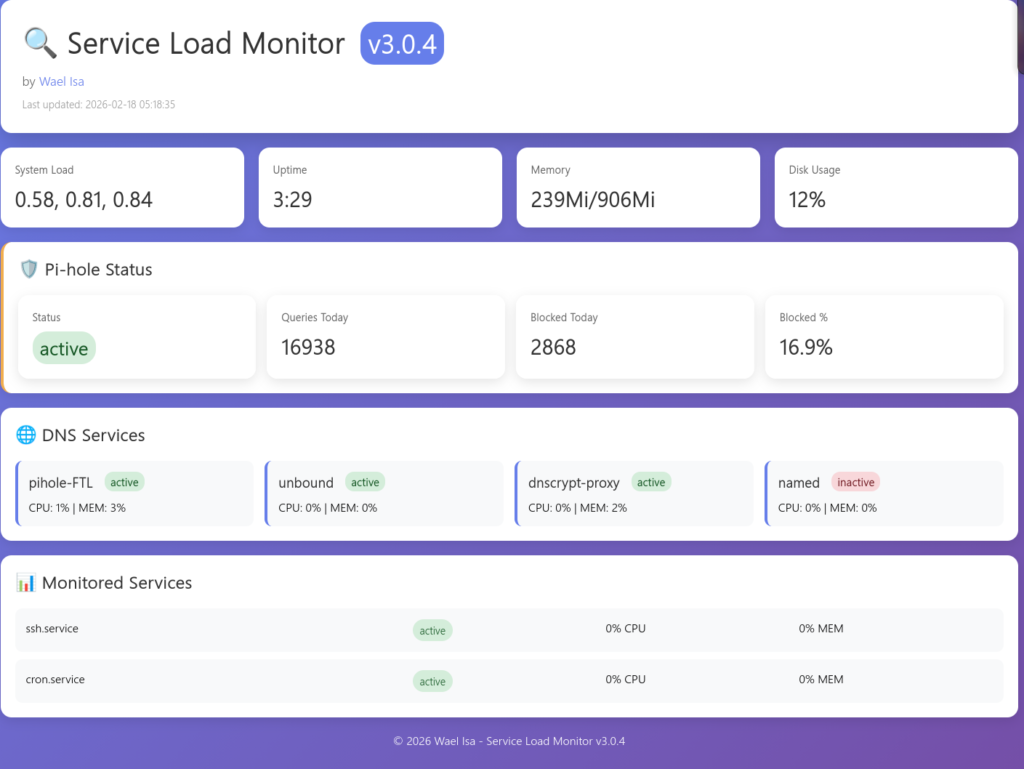
- Web Dashboard: Real-time HTML status dashboard with auto-refresh.
- Automatic firewall management: Detects and configures UFW or Firewalld automatically.
- Backup & Restore: Safety-first approach with automated configuration backups.
- Cloud Ready: Built-in awareness for AWS, Oracle Cloud, and Azure security environments.
🛠 Installation
You can install the Service Load Monitor with a single command:
Bash
wget -O service-load-monitor.sh https://github.com/waelisa/service-load-monitor/raw/refs/heads/main/service-load-monitor.sh && chmod +x service-load-monitor.sh && sudo ./service-load-monitor.sh
📋 Requirements
The script is designed to be universal and handles its own dependency installation. It supports:
- Distros: Ubuntu, Debian, CentOS, RHEL, Fedora, Arch Linux.
- System Manager: Systemd.
- Dependencies: curl, awk, procps, net-tools (all auto-installed if missing).
🚀 Usage
Simply run the script with root privileges to access the management menu:
Bash
sudo ./service-load-monitor.sh
Menu Options:
- Install/Update Monitor: Set up the background service.
- Remove Monitor: Cleanly uninstall all files and services.
- Show Status: View real-time service health and logs.
- View Logs: Tail the monitor’s activity log.
- Backup/Restore: Manage your configuration safety nets.
🌐 Web Dashboard
Once installed, you can monitor your server health from any browser at: http://your-server-ip:8080
Note: If you are using a Cloud Provider (AWS/Oracle), ensure you open port 8080 in your Cloud Console Security Group.
✅ Enterprise Features
- Auto-healing – Restarts only guilty services, not everything
- I/O Wait detection – Catches disk bottlenecks (the silent killer)
- Grand Unified Service Mapping – Maps ANY process to its systemd service
- Multi-server support – Central dashboard for multiple servers
✅ Operations-Ready
- Auto-starts on reboot – No manual intervention needed
- Comprehensive logging – Everything logged for troubleshooting
- Backup & restore – Full configuration backup before updates
- Clean upgrades – Automatic cleanup of old versioned files
✅ Security Hardened
- Sudo capability check – Verifies privileges before installation
- Protected critical services – Never restarts sshd, dbus, etc.
- Cloud-aware – Provides specific firewall instructions for AWS/Azure/GCP
- No version numbers in files – Clean, simple paths
✅ Universal Compatibility
- Works on Debian, Ubuntu, CentOS, RHEL, Fedora, Arch, Alpine
- Uses awk for math (no bc dependency)
- Multiple fallback methods for all commands
- HTML-free cloud detection – No more messy output
📊 The Final Product:
bash
# One command to rule them all
sudo ./service-monitor.sh

# Simple service names
sudo systemctl status service-monitor.service
sudo systemctl status service-monitor-http.service
sudo systemctl status service-monitor-updater.service

# Clean logs
tail -f /var/log/service-monitor.log

# Web dashboard
http://your-server:8080/
🤝 Contributing
Feel free to fork this project, report issues, or submit pull requests. For custom modifications or help, visit https://github.com/waelisa/service-load-monitor.
☕ Support the Project
If this script saved your server (and your sleep!) at 3 AM, consider supporting the development:
Author: Wael Isa
Website: www.wael.name
License: MIT